










It’s easy to confuse an SEO audit with a crawler report. You can run a site through Screaming Frog or Ahrefs in an hour (almost for free) and end up with a list of several hundred errors. The problem is that this list isn’t very useful on its own… it’s unclear which issues are critical and which can be ignored. Below, we’ll break down how our technical SEO audit differs, exactly what we check, and what you’ll end up with!
Tasks Covered by an SEO Audit
Not everyone needs an audit. We’re honest with our clients about that. There are websites for which an audit would be of little benefit at this stage. In our experience, clients come to us for an audit in one of four situations:
- The website is growing, but traffic is stagnating. Pages are being added and content is being published, but organic traffic isn’t increasing. Most often, new pages either aren’t being indexed or are competing with each other for the same search queries.
- Pages aren’t being indexed. The “currently not indexed” report is piling up in Google Search Console. Clients reach out to us for help with Google indexing, but sometimes it’s worth figuring out the root cause.
- Rankings have dropped for no reason. There were no updates or changes to the site, yet traffic has dropped. As a rule, something did change, just not where you were looking.
- You’ve invested in content and backlinks, but there are no results. This is the most common and most costly scenario: the budget is being spent on promoting a site that has fundamental technical issues.
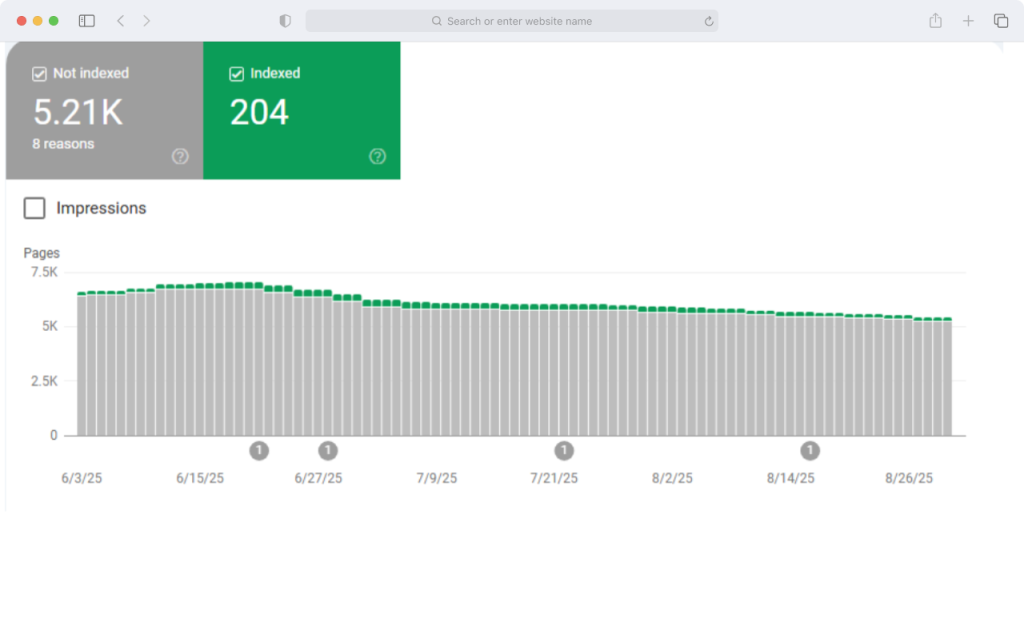
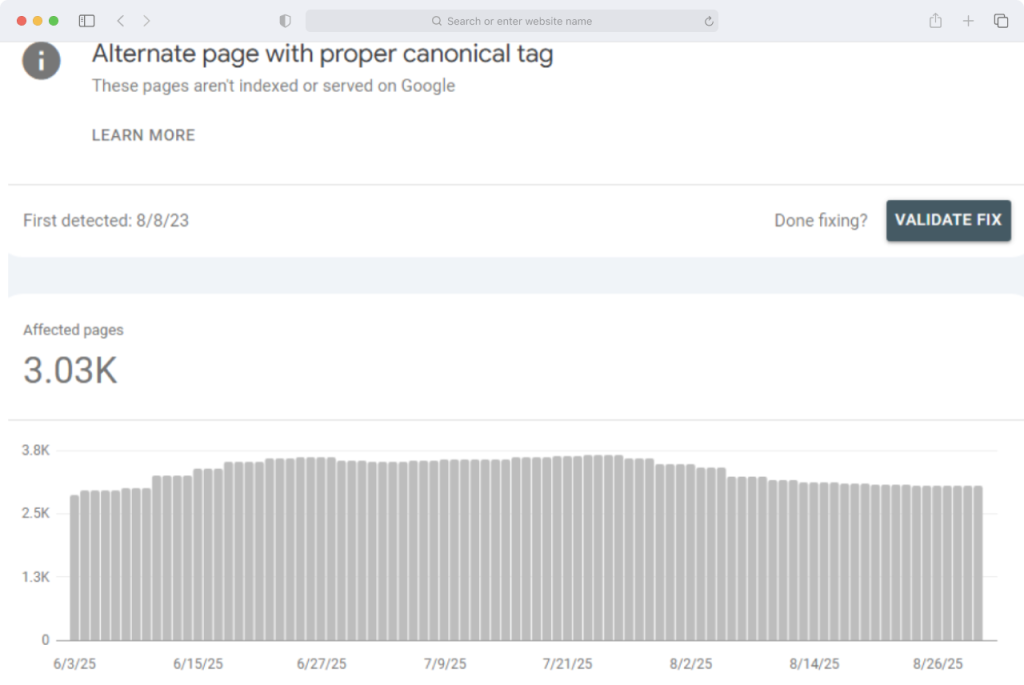
Here’s one example below. Take a look at how many pages are in the index and how many are not. The reason here isn’t penalties, but rather that the site itself generates thousands of technical URLs, and the crawl budget is being used up on them.
The opposite situation can also occur, and it’s best to address it right away. If you have a new website with 5-10 pages and no search history, there’s nothing to audit yet; you should start by researching keywords and site structure. If the problem is that you don’t know what to write about, you need a content plan, not an audit.
More Than Just Unloading From a Crawler
The first difference is that we explain the consequence, not the term. The phrase “canonical tags on pagination pages” means nothing to a business owner.
We do it differently: pagination pages are marked as non-canonical, which causes products on the second and subsequent pages of a category to be excluded from the index, resulting in a direct loss of traffic from product-related search queries. By the way, Google explicitly recommends leaving pagination pages open for crawling and using self-canonical tags.
The second difference is that each recommendation comes with a solution. It’s not just “set up canonical tags,” but a ready-made tag for a specific URL. Below is an example of a solution to a problem from one of our pre-made SEO audits:
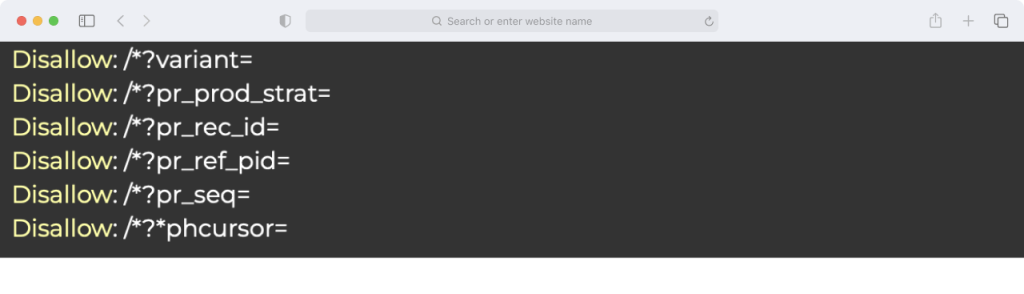
Not “exclude parameters from indexing,” but a ready-made directive for robots.txt. The goal is to ensure the report can be forwarded to the developer without needing to be translated from SEO jargon into plain language. For the same reason, we include links to live websites in your niche where the relevant element has already been implemented correctly with almost every recommendation. And third: if, during the audit, we identify a problem that falls outside the scope of the technical specifications, we address it anyway.
What Do We Test in Practice?
The scope of the audit depends on the package, but the technical framework is the same for all of them. We always start by examining how the website appears to a search engine crawler, and only then do we move on to how it appears to the user. This part of the work is divided into four areas:
- Indexing and crawler budget. The ratio of pages in the sitemap to those in the index, Search Console reports, pages with parameters, duplicates, canonical URLs, empty pages, and technical pages.
- Response codes, internal links, and multilingual support. Links to 404 pages and redirects, links to the HTTP version, correctness of hreflang, and response codes of pages specified in its attributes.
- On-Page, micro-markup, and speed. Duplicate titles, title-to-H1 matching, heading structure, presence and correctness of markup, and page load speed.
- Structure and internal linking. Distribution of internal weight, internal linking between categories and within product cards, and alignment of landing pages with search intent.
In our more expensive packages, we also handle external data. We analyze the backlink profile and prepare a disavow list, analyze competitors’ backlinks, review pages that are losing traffic, identify uncovered query clusters, and provide recommendations on E-E-A-T.
How Do We Set Priorities?
A list of fifty tasks without priorities is useless. That’s why each issue identified in our report is assigned one of three priorities, and the logic behind this classification is simple.
High priority is assigned to issues that are currently diverting traffic or hindering indexing (broken internal links, incorrect hreflang tags, query cannibalization). Medium priority is for issues that have an impact but aren’t urgent (technical URLs, duplicate titles across language versions, pages targeting geographic queries without product listings). Low priority refers more to cosmetic issues.
What Does the Result of an SEO Audit Look Like?
The audit report is not a single file, but a three-part set. The core component is a detailed report that analyzes each issue identified: what was found, why it’s important, what to do about it, and what the priority is. It includes screenshots from Search Console and the website, along with examples of best practices from other projects.
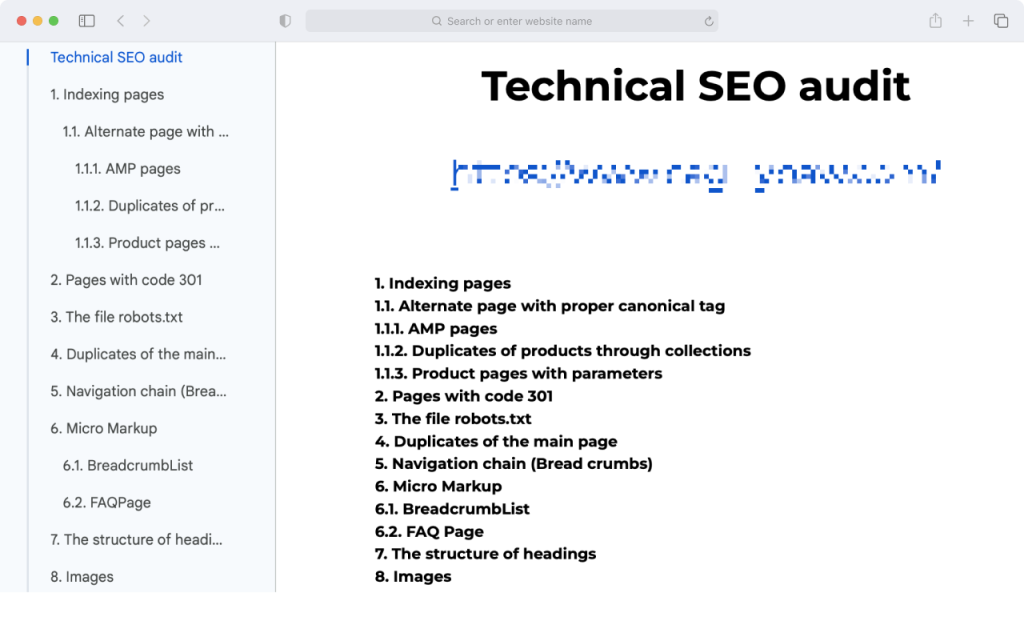
The report includes appendices with lists of URLs. This is a separate table containing a complete list of affected pages for each error type. For broken links, for example, the report specifies not only where the link leads but also on which page it appears. This is the part that the developer uses in their work. And the third part is a summary table of tasks with priorities: a compact, one-page checklist that makes it easy to plan sprints and track implementation progress.
What Makes Our Packages Different?
The Test package answers the question “What’s broken on my website?”: technical aspects, micro-structure, speed, and search audit. The Standard package adds external processes. Specifically, a backlink audit with a disavow list, an analysis of three competitors’ backlink profiles, and an analysis of pages losing traffic.
The Premium package answers the question, “Where am I falling short relative to the market?”: it covers five competitors, recommendations for improving top-ranking pages, uncovered query clusters, and E-E-A-T. The Advanced package is designed for projects with 200 or more pages; for these, we prepare a custom commercial proposal.
What Happens After the Audit?
Let’s get this out of the way right away: fixing any errors found is not included in the audit cost and is billed separately. From there, you have three options. You can implement the fixes yourself using the summary task list, send the report to your developer, or have us handle the implementation (either as a standalone project or as part of a full managed SEO package). To see how this works in practice, check out our case study on an eCommerce project from Europe. All we need from you at the start is access to Google Search Console and we’ll take care of the rest!

Yevhen Humeniuk, CEO of NeedMyLink